Popular Posts

Saturday, 17 August 2013

အိပ္ေဆာင္ MAC OSX Recovery Flash Disk ေလးပါ!

Credit @ Ko Nge

ဒါေလးက MAC OS X user ေလးေတြအတြက္ အေရးႀကီးတ့ဲ OS X Recovery Disk ေလးပါ...
 Flash Disk ႏွင္ဆိုရင္ အနဲဆံုး 1GB ရွိရပါမယ္၊ ေနာက္ Mac OS Extended (Journaled)  ျဖစ္ရမယ္တဲ့။

ေနာက္ OS X Recovery Disk Assistant v1.0 Download လုပ္ၿပီး မိိမိလိုခ်င္တဲ့ Flash Disk သို႕ HDD
ေတြထဲကို install သြင္းလိုက္ရံုပါဘဲ!
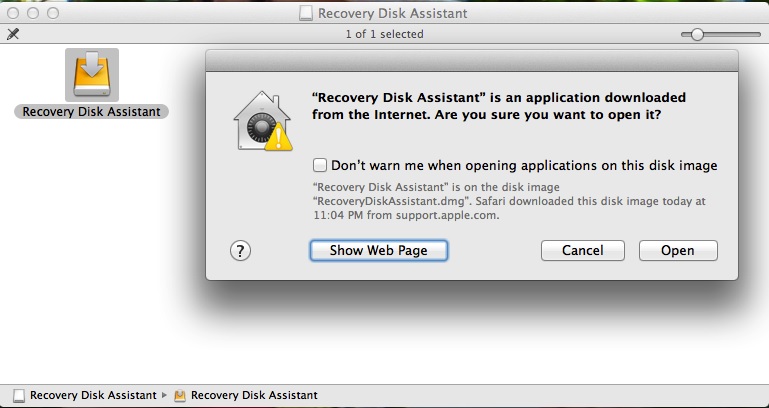


ဒါက မိမိလိုခ်င္တဲ့ ေနရာေတြမွာ install လုပ္လိုက္ရံုးပါဘဲ..
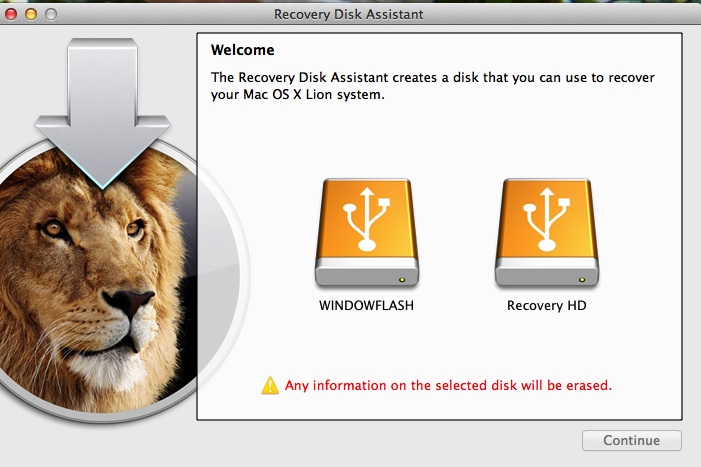
OS X Recovery Disk Assistant v1.0 Download

Built right into OS X, OS X Recovery lets you repair disks or reinstall OS X without the need for a physical disc.
The OS X Recovery Disk Assistant lets you create OS X Recovery on an external drive that has all of the same capabilities as the built-in OS X Recovery: reinstall Lion or Mountain Lion, repair the disk using Disk Utility, restore from a Time Machine backup, or browse the web with Safari.
Note: In order to create an external OS X  Recovery using the OS X Recovery Assistant, the Mac must have an existing Recovery HD.
To create an external OS X Recovery, download the OS X Recovery Disk Assistant application. Insert an external drive, launch the OS X  Recovery Disk Assistant,  select the drive where you would like to install, and follow the on screen instructions.
When the OS X Recovery Disk Assistant completes, the new partition will not be visible in the Finder or Disk Utility. To access OS X Recovery, reboot the computer while holding the Option key. Select Recovery HD from the Startup Manager. 
For detailed information on this update, please visit: About OS X Recovery Disk Assistant.

OS X: About Recovery Disk Assistant

Learn about Recovery Disk Assistant.

The Recovery Disk Assistant lets you create Recovery on an external drive that has all of the same capabilities as the built-in Recovery: Reinstall OS X, repair the disk using Disk Utility, restore from a Time Machine backup, or browse the web with Safari. This drive can be used in the event you cannot start your computer with the built-in Recovery HD, or you have replaced the hard drive with a new one that does not have Mac OS X installed.
System requirements
  • A Mac running OS X Lion or Mountain Lion with an existing Recovery System on its startup volume.
  • An external USB hard drive or thumb drive with at least 1GB of free space
How to use Recovery Disk Assistant

The Recovery Disk Assistant will erase all data on the external drive when creating the Recovery HD. You should either backup your data before running the Recovery Disk Assistant, or create a new partition on the external drive.
  1. Open Disk Utility, located in the Utilities folder in Launchpad.
  2. Select the drive on which you would like to install the Recovery HD and add a partition. Note: Partition should be at least 1 GB in size.
  3. Click Options and make sure GUID Partition Table is selected.
  4. Make sure the format for the partition is Mac OS Extended (Journaled).
  5. Click Apply.
Open Recovery Disk Assistant and follow the on screen instructions to create a Recovery HD on the external drive.

When the Recovery Disk Assistant completes, the new partition will not be visible in the Finder or Disk Utility. To access the external Recovery HD, connect the drive, then restart the computer and hold the Option key. Select Recovery HD from the Startup Manager.
Notes
  • If the computer shipped with OS X Lion or Mountain Lion, the external recovery drive may only be used with the system that created it.
  • If the system was upgraded to Lion or Mountain Lion purchased from the App Store, the external recovery drive can be used with other similarly-upgraded systems. 

Additional Information

To download the Recovery Disk Assistant, click here.


At some point, you may find a need to boot your Mac from a disc or a drive other than the primary Mac OS X startup volume. Apple made it easy so all you need to know is just a simple keyboard command.

Boot your Mac from CD, DVD, external drive, or USB flash driveLet’s say you need to use the Mac OS X installation disc that came with your computer to reformat the hard drive and put it back to factory settings. Or maybe you’re trying to boot from a USB flash drive that has a clean install of OS X on it for troubleshooting purposes. Perhaps you’ve got a cloned backup of your entire Mac on an external hard drive and you want to make sure it’s bootable. These are all potential reasons for booting to an external device, among many others.
There easiest way to boot to any device other than a Mac’s internal hard drive is to press and hold the Option key immediately after hearing the Mac startup chime. Continuing to hold this button down will bring up a menu where you can select a disc or drive to boot from. Use the keyboard arrows to choose your boot device, then press the Enter key. The computer will start up from the chosen volume, but bear in mind performance will likely be much slower than when you normally operate your Mac. This is especially true of USB flash drives.
Rather than hold the Option key, you could instead just press & hold the C key if you’re booting from a CD or DVD disc. This will bypass the selection menu and immediately start from the disc. It won’t work for USB and FireWire drives, though.
Booting to another volume using either of these methods is a one-time temporary change, so you don’t have to worry about altering any settings to reverse it. Your Mac will go back to booting to it’s primary startup disk next time you reboot.

 ေနာက္ဆက္တြဲေလးသတိေပးခ်င္တာက...

Extranal HDD ေတြမွာ Format ေတြ မတူပါဘူးဆိုတာပါ....ဆိုုလိုုတာကWindow PC ႏွင့္MAC OS ေတြမွာ Format မတူက်ပါဘူးလိုု႔ေျပာတာပါ၊

ကၽႊန္ေတာ္အခု Window format က ေန OS format ေတြဆီ Files ေလးေတြကူးယူေနတာ အေတာ္မ်ားမ်ား Error ျပပါတယ္။ File ဆိုဒ္ေတြႀကီးေနတာမ်ားတာကိုး အားလံုးကိုတခါထဲကူးခ်လိုက္တာေလ...
ဒီေန႔က စေနေန႔ဆိုေတာ့အလုပ္ကUser ေတြလဲ ဒုကၡသိပ္မေပးတာႏွင့္ အားေနလို႔  Window HDD ေတြကေန အသစ္ Format ခ်ထားတဲ့ WD Passport ထဲကိုကူးယူေနရက Password ရိုက္မွားၿပီး ျပန္ဖြင့္လို႔မရေတာ့ဘူးေလ! ဒါက WD ရဲ႕ဆိုးက်ိဳးေတြဘဲ!..-:(
အခုလဲ WD passport က password ေမ့သြားလို႔! ဘယ္လိုမွာျပန္ဖြင့္လို႔မရတာႏွင့္ အကုန္ျပန္ၿပီး Format ျပန္ခ် လိုက္ရ တယ္ေလ.....အေရးႀကီးတဲ့ Files တခ်ိုဳ႕လဲပါသြားတယ္ေလ.....
ခါတိုင္းသံုးေနက် Bufallo ႏွင့္ Seagate HDD ေတြဘဲေကာင္းတယ္!  WD HDD ကိုလက္လွန္သြားၿပီဗ်ာ!

အခု WD ကို EXFAT 64 format ခ်ၿပီး copy files ေတြကူးယူၿပီး ရံုးက Desktop စက္က XP Ver ႏွင့္ဖြင့္လို႔မရျပန္ဘူးတဲ့
ေလ! ဒါေၾကာင့္ MDOS FAT32 (UDF) format ျပန္ခ်လိုက္ရျပန္တယ္၊ ေရေရလည္အံုးစားေစတဲ့ MAC  OS  စီးရီးေတြ 
ေလ ႏွင့္ Window စီးရီးေလးေတြ တခုမွာေကာင္းရင္ ေနာက္တခုႏွင့္အဆင္မေျပျပန္ဘူးေလ။ ေနာက္ဆံုးေတာ့ အားလံုး
ႏွင့္ အကိုက္ဆံုးျဖစ္တဲ့ FAT 32 ဘဲေရႊးလိုက္ရပါေတာ့တယ္၊ Files Site ေသးလို႔ 4GB ဘဲ Copyကူးလို႔ရလို႕ေလ....

How to format a drive for Mac and PC compatibility


If you have an external hard drive or USB flash drive that you’d like to use on both Macs and Windows PCs, choosing the right file system to format the drive can be confusing. Learn a few ways to make your drive Mac and PC friendly.

How to format a drive for Mac and PC compatibilityNeed to access or transfer files between Mac and PC? As simple as this task sounds, it’s not very straightforward for inexperienced users. Since Mac OS X and Windows use totally different file systems, the way a drive is formatted can determine what type of computer it will work with. In fact, there are four ways you can format an external or USB flash drive to achieve varying degrees of compatibility between Macs and PCs. Let’s take a look at them:

HFS+

Mac OS X’s native file system is HFS+ (also known as Mac OS Extended), and it’s the only one that works with Time Machine. But while HFS+ is the best way to format drives for use on Macs, Windows does not support it. If you’re only going to be using your external or USB flash drive with certain PCs – such as at home or the office – you might be interested in a program called MacDrive. When you install MacDrive on a Windows PC, it will be able to seamlessly read & write to HFS+ drives. This isn’t a good solution if you need your drive to work on any PC without installing software, though.

NTFS

The native Windows file system is NTFS, which is only partially compatible with Mac OS X. Macs can read files on NTFS drives, but it cannot write to them. So if you need to get files from a PC to your Mac, NTFS is a decent option. However, you won’t be able to move files in the other direction, from Mac to PC.

FAT32

The most universally supported way to format your drive is with the FAT32 file system. It works with all versions of Mac OS X and Windows. Case closed, right? Well, not so fast. Unfortunately, FAT32 is a very old file system and has some technical limitations. For example, you cannot save files that are larger than 4GB on a FAT32-formatted drive. This is a deal-breaker if you work with huge files. The other limitation is the total size of the partition. If you format your FAT32 drive in Windows, the drive partition cannot be larger than 32GB. If you format it from a Mac running 10.7 Lion, the drive partition can be up to 2TB. Much better, except for that pesky 4GB limit.

exFAT

The exFAT file system eliminates the two major deficiencies of FAT32: the largest partition and file sizes it supports are virtually unlimited by today’s standards. Awesome, it’s perfect! Almost… since exFAT is fairly new, it isn’t compatible with older Macs and PCs. Any Mac running 10.6.5 (Snow Leopard) or 10.7 (Lion) supports exFAT, while PCs running Windows XP SP3, Windows Vista SP1, and Windows 7 are compatible. If you know you’ll be using computers running updated versions of these operating systems, exFAT is the clear best choice.

Format a drive using Disk Utility on a Mac

  1. Launch Disk Utility (Applications > Utilities).
  2. Select your external hard drive or USB flash drive from the list on the left.
  3. Click on the Erase tab. Select the format – Mac OS Extended (HFS+), MS-DOS (FAT32), or exFAT – then name the drive.
Ref:www.macyourself.com


မိမိ Facebook Profile မွာ Virus ရွိမရွိစစ္ေဆးၾကည့္လိုက္က်ရေအာင္!

Credit @ Ko Nge

အခုေနာက္ပိုင္းမွာ နာမည္ႀကီးေနတဲ့ Website ေတြကို လုိက္ၿပီးတိုက္ခိုက္ေနတတ္က်ပါတယ္၊
အခ်က္အလက္ေတြလုိက္ခိုးေနက်သလို အေရးႀကီးတဲ့ password ေလးေတြကို လိုက္ခိုးေနတတ္က်ပါ
တယ္၊ ဟိုတေလာက အသိတေယာက္ သူမ်ားေတြရဲ႕ Wifi ေတြကိုလုိက္ခိုးသံုးေနတယ္လို႕သိလိုက္ရပါ
တယ္!  ဘာေၾကာင့္မွန္းမသိက်ပါဘူး ဘာမွမဟုတ္တာေတြကိုလိုက္လုပ္ျခင္က်လဲမသိပါဘူး!
တခ်ိဳ႕ကဘာမွရည္ရြယ္ခ်က္မရွိဘဲ လက္တည့္စမ္းၾကည့္ေနတတ္က်ပါတယ္၊ ဘယ္ေလာက္ ဥပေဒအရ ရာဇ၀တ္ပုဒ္မႀကီးတယ္ဆိုကိုလဲ သိက်ဟန္မတူးပါဘူး! ဘာမွမျဖစ္ ဘာမွမျဖစ္ပါဘူး၊
အဲ! မေတာ္တဆလက္တည့္စမ္းရင္းႏွင့္ ပိုင္ရွင္ကသိသြားလို႕ရဲတိုင္လိုက္ရင္ ဘယ္လိုမွရွင္းလို႔မရတဲ့ ျပႆနာေတြရွုဳပ္ကုန္တတ္ပါတယ္ေလ.....
 
ဒါေၾကာင့္ဒီမွာ မိမိရဲ႕facebook ေတြကိုစစ္ၾကည့္လိုက္ပါအံုးေနာ္....
ဒီSoftware က iphone ရဲ႕ itune appcation မွာလဲ free ေပးထားပါတယ္၊ Downloade လုပ္ၿပီး
စမ္းၾကည့္လိုက္ပါအံုးေနာ္....
 

ဒီ မိမိရဲ႕ Facebook မွာ Black Berry Virus ရွိေနၿပီလို႔ေျပာေနပါတယ္...
ဘယ္လိုရွင္းရမလဲဆိုတာ ရွာရပါအံုးမယ္ေလ...-း(

 
ေနာက္ထပ္မိမိရဲ႕တျခား Facebook မွာေတာ့ Virus လံုး၀ကင္းစင္ပါတယ္ေျပာပါတယ္....


ကၽြန္ေတာ္တို႔ ရဲ႕ Facebook Social Network ေလးကို တိုက္ခိုက္သူေတြကမ်ားလာပါၿပီ...လူသံုးကလည္း မ်ားလာတာလဲပါမွာေပါ့ေလ၊ဒါေၾကာင့္မိမိရဲ႕ Facebook ေတြမွာ ကိုယ့္ဘက္က လံုျခံဳမႈရွိေအာင္ေတာ့ ထားရမယ္ေလ၊ ကၽြန္ေတာ္အခု ေျပာမွာေလးက virus ေတြ ကိုယ့္ Facebook profile မွာရွိေနလား ဆိုတာ
စစ္ေဆးဖို႔ိလိုအပ္ေနပါၿပီ၊  Virus မရွိဘူးဆိုရင္ေတာ့ စိတ္ခ်လက္ခ်ေနလို႔ရၿပီေပါ့၊
အခုလဲ နာမည္ႀကီးAntivirus ေလး Bitdefender က လုပ္ေပးထားတဲ႔ Virus Scanner ေလးပါလုပ္နည္း
ေလးပါ....ဘာမွာအခက္ပါဘူးလြယ္လြယ္ေလးပါေနာ္....
မိမိရဲ႕ Facebook ေတြမွာ Search မွာ   Bitdefender Satego လို႔ရိုက္လိုက္ရင္ 

ဒီဆိုဒ္ေလးကိုသြားလိုက္ပါ

ၿပီးရင္ေတာ့ အဲမွာ Get It Free ဆိုတာေလးကိုႏွိပ္ေပးလိုက္ပါ

ၿပီးရင္ ေအာက္ကပံုေလးအတိုင္းဆက္သြားပါ
 
 
ၿပီးရင္ ေအာက္ကပံုေလးအတိုင္း Okey ကိုႏွိပ္ၿပီးဆက္သြားပါ


 ၿပီးရင္ ေအာက္ကပံုေလးအတိုင္း Okey ကိုႏွိပ္ၿပီးဆက္သြားပါ


ဒါေပၚလာၿပီး Auto Scaner လုပ္သြားပါလိုက္မယ္..
 
 
ဒါဆိုသူက facebook app ဆီေရာက္သြားၿပီ၊ဒါဆို infection ရွိလား မရွိလား သူေျပာပါတယ္ ေအာက္ကပံုေလးအတိုင္းအစိမ္းေရာင္အမွတ္ေလးနဲ႔ No infections ဆိုရင္ေတာ့စိတ္ခ်ရတယ္လို႔ဆိုႏိုင္ပါတယ္ ---း)
 
 
- Posted using BlogPress from my iPhone5

Friday, 16 August 2013

Apple will launch 128GB iPhone 5S


16 August, 2013 
It is all but certain that Apple will be unveiling two new iPhone models, iPhone 5S and iPhone 5C, onSeptember 10. Both devices have been leaked numerous times and have provided us some valuable information and now, we have an interesting prediction from a popular analyst, who claims that Apple will be launching a 128 GB model of iPhone 5S.
According to KGI analyst Ming-Chi Kuo, Apple will also be selling its iPhone 5S with a whopping 128 GB of storage. If the predictions from the analyst, who has been quite accurate in the past, turn out to be true, then iPhone 5S will be the second Apple product after iPad 4 to feature the massive storage capacity.
The 128 GB model of the iPhone 5S would cost $499 (on contract) under the Apple's current pricing scheme.
Ming-Chi Kuo also expects the upcoming iPhone to be powered by a new A7 chip that features 1 GB of LPDDR3 RAM. The latest chip is said to be built on the ARMv8 architecture and will be 20% more energy efficient than previous A6 SoC.
The analyst also confirms that the iPhone 5S will indeed house an upgraded camera with bright F/2.0 aperture and dual-LED flash. This means that the iPhone 5S camera should have better low-light performance than the previous models.
Lastly, Apple is also expected to unveil a gold color option for the iPhone 5S in addition to the classical Black and White paintjobs.

Photos of Apple iPhone 5S chassis components surface

14 August, 2013 
There are plenty of rumors going around about the iPhone 5S, including things like a dual-LED flash and a fingerprint scanner. Now, leaked components of the next-gen iPhone show changes to the top of the back and around the home button, which might be due to the inclusion of just those components.
Another noticeable change in the components is that the mounting points for the motherboard have been moved around slightly. It seems to fit the previously leaked images of the back just right, but of course, none of these changes guarantee that we will see a more powerful flash or a fingerprint reader.
There was some talk of a 4.3" screen too, but neither the front nor the back pieces of the alleged iPhone 5S chassis seem to support that. Here's a better look at the front and the home button assembly.
The Apple iPhone 5S along with its lower-cost sibling, the iPhone 5C, will be unveiled on September 10 and released on October 25 if the rumors are to be believed.

Ref:gsmarema

PC Windows or Mac Which is Better!


PC Windows and Mac Comparison chart

  mac 300x153 PC Windows / Mac Comparison

PC Windows or Mac Which is Better

MacPC Windows
What is it?:Short form for “Macintosh” and refers to any computer produced by Apple, Inc.Refers to any computer running IBM-Based(Windows, Linux, Solaris, FreeBSD) Operating Systems.
Manufacturer:Apple Inc., is the only manufacturer of Macintosh computers.Microsoft creates the OS, while companies like HP, Toshiba, Dell, Lenovo, etc. install the Windows OS onto the computer, and assemble the PC.
OS family:Unix-like (BSD>Darwin>Mac)Windows, Linux, Solaris, FreeBSD, etc.
Cost:Computers start at $599 for the Mac Mini, and $999 for the Macbook Air. Other models are more expensive. For desktop or home use Macs are more expensive than a PC.Compared to a Mac, Windows and Windows-associated hardware is almost always cheaper. Computers running Windows can be found usually 40-75% cheaper than a Mac.
Supported architectures:Intel Microprocessorsx86 & x86-64 Intel and AMD processors
Popular Applications:iLife, iWork, Xcode, iTunes, Time Machine, Safari, Mac App Store, FaceTime, Game Center, Photo BoothMS Office, Internet Explorer, Media Player, Media Center, Windows Defender, SkyDrive
Market Reach:Attracts graphic designers, video and music producers, tech journalists, app developers etc.Wide reach to all stratas. Business users tend to use Windows hardware due to compatibility.
Gaming:There is a very limited number of games available natively for Macs, however Macs can run .exe files using WINE or CodeWeavers. Some of the more popular titles are released much later, if at all, for the Mac. There is no native DirectX support in MacThe library of games available for the PC is exhaustive, and hardware specifically tweaked for gaming performance is much more readily available for Windows. The array of graphics cards and upgradability also favor Windows-based computers.
Website:www.apple.comwww.microsoft.com
Development and Distribution:Macs is developed and distributed by Apple, Inc.PCs are manufactured and distributed by hundreds of manufacturers.
Compatibility:Can open some PC files and can coexist on local networks with PCs. Can open .doc, .exe (as a compressed bundle), .xls, and others. Software exists for other file types.Mac-based files (.DMG) cannot be opened on Windows natively, but you can install software that can read, and possibly write Mac-based files on a PC.
System Software:Macintosh Operating System; also allows Windows.Various versions of Windows operating system. Using Linux and associated partitioning software, you can install many Linux, Solaris, FreeBSD distributions alongside your current Windows installation.
Latest stable release:OS X 10.8 Mountain LionWindows 8
Supported Versions (Mainstream)Mac OS X 10.6, OS X 10.7, 10.8 (Apple dropped the ‘Mac’ prefix with the release of Mountain Lion and lion also changed later)Windows XP, Windows Vista, and Windows 7, Windows 8
Performance:Since Apple have controlled the hardware & software bundles and model updates, so every Mac operates smoothly without worry on lagging, incompatibles. And have stable and expected performanceDifferent OEMs and even custom build PCs might not have the suitable drivers released for every components in each OS version, incompatibles, lagging may occur. Maybe cannot reach expected performance
Virus Attacks:Since Macs are not as popular as PCs, there are fewer malware written to target Macs, although the threat of malicious software is growing, like from Java.Being the popular desktop choice, most virus writers target Windows systems. But Linux and others have less.
Repairs:Any knowledgeable person can perform repairs and upgrades. Local computer-help stores can also be contacted for repairs. AppleCare can extend the warrantyAny knowledgeable person can perform repairs and upgrades. Local computer-help stores can also be contacted for repairs. OEMs and component shops provides limited warranty
User:Home users and Business (mainly in the creative department)Home users and Business
Programs and apps:Same as gaming, limited choice due to user range and less developer powersSame as gaming, excess choice due to user range and large developer powers
Piracy Prevention:Since each mac have a unique serial, no activation required and OS X allowed for Mac hardware only, so Apple does not put much force on genuine checkingWindows have a unique activation key for each package distribution, and lots of custom and OEM PC appears, so genuine checking become important. Linux, Solaris, FreeBSD is free and no need for this

Summary :
Mac – Suitable for Home Use, Non-Gamer, Apple Programmer, Soho Business, Video/Audio Production Houses, Printing Houses
PC – Suitable for Home Use, Gamer, Windows Programmer, Enterprise/SME Business

အမ်ဳိးသမီးမ်ားကို ဝမ္းဗုိက္နာက်င္ေစၿခင္း အေႀကာင္းရင္း ( ၅ ) ခ်က္


အမ်ိဳးသမီးအမ်ားစုဟာ ဗိုက္ေအာင့္ျခင္း အျဖစ္မ်ားပါတယ္။ အမ်ိဳးသမီးေတြမွာျဖစ္တတ္တဲ့ ဗိုက္ေအာင့္ဗိုက္နာျခင္းဟာ ေအာက္ပါအေၾကာင္းရင္း ငါးရပ္ေၾကာင့္ အျဖစ္မ်ားပါတယ္။


၁။ သားအိမ္အတြင္းလႊာ ေနရာလဲႊျခင္း

ျဖစ္ပြားႏႈန္း - အမ်ိဳးသမီး ငါးသန္းနီးပါး
ေရာဂါအေၾကာင္း ....သားအိမ္တစ္သွ်ဴးေတြနဲ႔တူတဲ့ ဆဲလ္ေတြဟာ ေနရာလဲြမွားတည္ရိွၿပီး ရာသီေသြးဆင္းတုိင္း လုိက္လံကြာက်ေနတာမ်ိဳးပါ။
ခံစားရတတ္ေသာ လကၡဏာမ်ား - ရာသီလာခ်ိန္မွာ ေရာၿပီး ဗိုက္ေအာင့္ျခင္းကို ဆုိးဆုိးရြားရြားခံစားရျခင္း၊ ခါးနဲ႔ေျခေထာက္ အထိနာက်င္ျခင္း
စမ္းသပ္စစ္ေဆးျခင္း - တစ္သွ်ဴးအသားစယူ စစ္ေဆးျခင္း
ေဆးကုသမႈ - Ibuprofen, Naproxen sodium စတဲ့ အကိုက္အခဲေပ်ာက္ေဆးေတြနဲ႔ ေဟာ္မုန္းပါ သေႏၶတားေဆးေတြ သံုးၿပီး ကုသေလ့ရိွပါတယ္။ ဆုိးရြားတဲ့ အေျခအေနေတြမွာ သားအိမ္အတြင္းလႊာႀကီးထြားမႈကို ဖယ္ရွားဖုိ႔ ခဲြစိတ္ကုသတဲ့နည္းကို သံုးေလ့ရိွပါတယ္။


၂။ ဆီးအိတ္တာရွည္ေရာင္ရမ္းျခင္း

ျဖစ္ပြားႏႈန္း - အမ်ိဳးသမီး သံုးသန္းနီးပါး
ေရာဂါအေၾကာင္း -ဆီးအိတ္ထဲမွာ မၾကာခဏ မသက္မသာျဖစ္ရတဲ့ ခံစားခ်က္မ်ိဳးပါ။ ဘက္တီးရီးယားပိုးေၾကာင့္ မဟုတ္ဘဲ ဆီးအိတ္တာရွည္ ေရာင္ရမ္းတာပါ။
ခံစားရတတ္ေသာ လကၡဏာမ်ား - ဆီး မၾကာခဏ သြားခ်င္တာနဲ႔ ဆီးသြားတဲ့အခါ နာက်င္တာေတြကို ခံစားရတတ္ပါတယ္။
စမ္းသပ္စစ္ေဆးျခင္း - ဆီးလမ္းေၾကာင္း ပိုးဝင္ျခင္းဟုတ္၊ မဟုတ္ ေသခ်ာေအာင္ ဆီးထဲမွာ ဘက္တီးရီးယားပိုးရိွ၊ မရိွ စစ္ေဆးျခင္းနဲ႔ ဆီးအိတ္ကို Cytoscope သံုးၿပီး ၾကည့္႐ႈျခင္း။


၃။ ဝမ္းဗိုက္ေအာက္ပိုင္းရိွ ႂကြက္သားမ်ား နာက်င္ကိုက္ခဲျခင္း

ျဖစ္ပြားႏႈန္း - အျဖစ္မ်ားေပမယ့္ လူဦးေရ ဘယ္ေလာက္မွာ ခံစားေနရမွန္း အတိအက်မသိပါ
ေရာဂါအေၾကာင္း - ႐ုပ္ပိုင္းနဲ႔ စိတ္ပိုင္းဆိုင္ရာ အေျခအေနႏွစ္ရပ္စလံုးဟာ တင္ပါးဆံုအဂၤါေတြကို ေထာက္ပံ့ေပးထားတဲ့ တင္ပါးဆံုႂကြက္သားေတြအေပၚ နာတာရွည္ ဖိအားသက္ေရာက္ေစႏိုင္ပါတယ္။
ခံစားရတတ္ေသာ လကၡဏာမ်ား - ဝမ္းဗိုက္ေအာက္ပိုင္းနာက်င္ျခင္း၊ မိန္းမကိုယ္နာက်င္ျခင္း၊ ပူစပ္ပူေလာင္ျဖစ္ျခင္းနဲ႔ ဆီးႁပြန္နာက်င္ျခင္း
စမ္းသပ္စစ္ေဆးျခင္း - ခႏၶာကိုယ္ကို စစ္ေဆးမႈ ျပဳလုပ္ျခင္း (Physical Examination)


၄။ ဝမ္းဗိုက္တြင္း ေသြးေၾကာထံုးျခင္း

ျဖစ္ပြားႏႈန္း - အမ်ိဳးသမီး ခုနစ္သန္းနီးပါး
ေရာဂါအေၾကာင္း - ဝမ္းဗိုက္ထဲက ေသြးေၾကာေတြ ထံုးတာေၾကာင့္ နာက်င္မႈ ျဖစ္ေစႏိုင္ပါတယ္။ ေျခေထာက္ေသြးေၾကာထံုးျခင္းလုိပဲ ေသြးျပန္ေၾကာထဲက အဆုိ႔ရွင္ေတြဟာ အားနည္းၿပီး ေသြးစီးဆင္းအားနည္းတာေၾကာင့္ နာက်င္တဲ့ ဖိအားကို ျဖစ္ေစပါတယ္။
ခံစားရတတ္ေသာ လကၡဏာမ်ား - ဝမ္းဗိုက္ေအာက္ပိုင္းမွာ စူးစူးရွရွေအာင့္ျခင္း၊ နံနက္ခင္းမွာ သိပ္မနာဘဲ တျဖည္းျဖည္း ပိုမိုနာက်င္လာျခင္း (လဲေလ်ာင္းလိုက္တဲ့အခါ ဒါမွမဟုတ္ အပူကပ္တဲ့အခါမွာ နာက်င္မႈ ပိုဆုိးတတ္ပါတယ္)
စမ္းသပ္စစ္ေဆးျခင္း - Transcervical venogram လုိ႔ေခၚတဲ့ အထူးစစ္ေဆးနည္းသံုးၿပီး ပံုမမွန္ေသြးျပန္
ေၾကာ အရြယ္အစားနဲ႔ ေသြးစီးဆင္းႏႈန္းကို တုိင္းတာႏိုင္ပါတယ္။


၅။ တာရွည္ မိန္းမကိုယ္နာျခင္း

ျဖစ္ပြားႏႈန္း - အမ်ိဳးသမီး ေျခာက္သန္းနီးပါး
ေရာဂါအေၾကာင္း - တာရွည္မိန္းမကိုယ္နာတာဟာ ဘာေၾကာင့္ ျဖစ္ရသလဲဆိုတာ ေသခ်ာမသိေသးပါ။ မိႈကူးစက္ပိုးဝင္ျခင္းေၾကာင့္ ျဖစ္ႏိုင္သလို ျမင္းစီးျခင္းနဲ႔ ကေလးေမြးဖြားရာမွ နာ့ဗ္ေၾကာ ထိခုိက္သြားတာေၾကာင့္ ျဖစ္တတ္ပါတယ္။
ခံစားရတတ္ေသာ လကၡဏာမ်ား - မိန္းမကိုယ္မွာ တာရွည္နာက်င္မႈ ဒါမွမဟုတ္ သက္သာလုိက္ ျပန္ျဖစ္လုိက္ နာက်င္မႈဟာ တင္ပါးနဲ႔ ေပါင္ရင္းေနရာအထိ ပ်ံ႕ႏွံ႔သြားတတ္ျခင္း၊ ရာသီေသြးထိန္းေတာင့္ထည့္ျခင္း၊ က်ပ္တဲ့ ဂ်င္းေဘာင္းဘီဝတ္ျခင္းနဲ႔ အထုိင္မ်ားျခင္းေတြေၾကာင့္လည္း မိန္းမကိုယ္ နာက်င္တတ္ပါတယ္။
စမ္းသပ္စစ္ေဆးျခင္း - နာက်င္မႈကို စစ္ေဆးႏိုင္ဖုိ႔ မိန္းမကိုယ္ဝကို စစ္ေဆးတဲ့ Cotton Swab test နဲ႔ စစ္ေဆးေလ့ရိွပါတယ္။
Ref:satekuupuyar.blogs
- Posted using BlogPress from my iPhone5

ျမန္မာစာကို MAC LION OS 10.7 မွစၿပီးျမန္မာလို ဖတ္လို႕ရၿပီတဲ့!

ၿမန္မာစာကို  MAC LION OS 10.7 Version က  စၿပီး
ၿမန္မာလို ဖတ္လို႕ရၿပီလို႔ေျပာတယ္...
ဒါေပမဲ့အခု MAC OSX Mountaion Lion 10.8  Version  မွာ ေဇာ္ဂ်ီေဖာ့ေတြကိုုေတာ့ ဘေလာ့ေတြမွာစာေရးရတာအဆင္ကိုမေျပေသးပါဘူးလို႔၊အခုလိုေဇာ္ဂ်ီလိုစာေရးေနတာကိုက စာေရးေနတဲ့ဘေလာ့စာမ်က္ႏွာေတြမွာေတာ့ျမန္မာစာကိုေကာင္းစြာျမင္ရဖတ္ရမွာ
ေတာ့မဟုုတ္ပါဘူး၊ စာရိုုက္ရတာေတာ္ေတာ္ကိုုမဆင္မေျပဘူးျဖစ္ေနပါတယ္ေလ၊ ဘေလာ့စာမ်က္ႏွာေတြမွာ စာရိုက္ခ်င္ရင္ အသစ္၀ယ္ထားတဲ့ Parallets 8 က Window 8 ဖက္ကိုကူးၿပီးမွ Window Explorer မွ စာရိုက္ေနရတာပါ၊ Window Chrome မွာေတာင္
ျပႆနာရွိေနေသးတယ္ေလ၊ MAC OSX က Facebookေတြမွာေတာ့ေကာင္းစြာ ေဇာ္ဂ်ီလိုေကာင္းစြာရိုက္လို႔ရၿပီး ဒီဘေလာ့စာမ်က္ေတြမွာ စာေကာင္းစြာရိုက္လို႔မရဘူးျဖစ္ေနတာေလ.....
ေနာက္ထပ္အေျဖထပ္ရွာရပါအံုးမယ္ေလ...ဒီဖတ္ကိုေျပာင္းလိုက္ရင္ စက္ကေလးသြားေတာ့ မသြားခ်င္ဘူးေလ....တတ္ႏိုင္ရင္ OS ဖက္မွာလဲ စာရိုက္ခ်င္တယ္...ဒါလဲ Zaegyi သံုးရတာအဆင္ေျပဖူးဆိုတာေျပာတာပါ၊ ထင္ပါတယ္ Zawgyi ကေန font ေျပာင္းေရးရေတာ့မဲ့ အေျခေနေရာက္ေနၿပီလား! မသိေတာ့ပါဘူ?
ေနာက္ၿပီး အရင္၀ယ္ထားတဲ့ Extranal HDD ေတြမွာလဲ HDD ေတြရဲ႕ format ေလးေတြမတူတာလို႔
ဖတ္လို႔မရဘူးျဖစ္ေနတယ္ေလ၊ ဒါေတြႏွင့္  HDD ေတြမွာရွိတဲ့ Files ေတြကို PC ႏွင့္ OS ၂ခုလံုးဖတ္လို႔ရ
ေအာင္လုပ္ေနတာပါ။
ေနာက္ WD HDD 1TB ကလဲ Window ဘဲဖတ္တဲ့ NTFS ကေန PC ႏွင့္ OS 2ခုလံုးဖတ္တဲ့ ExFat ကို format ေျပာင္းၿပီး တခုခ်င္း Copy ေတြျပန္ကူးေနရတယ္ေလ၊ ဘာျဖစ္လို႔လဲဆိုေတာ့ အရင္တုန္းက HDD ေတြတခုကေန တခု files ေလးေတြေျပာင္းတုန္က ေသခ်ာျပန္မစစ္မိလို႔ ျမန္မာသီခ်င္းေတြပါတဲ့ itune copy files ေလးေတြေပ်ာက္ကုုန္လို႔ မႏွစ္က iphone 5 အသစ္ကို Copy ျပန္ကူးေတာ့မွသိတယ္ေလ.... ျမန္မာသီခ်င္းေပါင္းတေထာင္ေက်ာ္ေတာ့ ေသတာေပါ့ေနာ္...အစဆံုးျပန္ Download ျပန္လုပ္ေနရတာေပါ့ဗ်ာ...
အခု Buffalo HDD 500 GB က Window မွာဘဲဖတ္လို႔ရတဲ့ UDF format ျဖစ္ေနလို႔ files ေတြကိုေရႊ႕
ေျပာင္းေနရတာ format ျပန္ခ်ေနရတာႏွင့္ အလုပ္ရႈပ္ေနတာပါ၊ ဘာမွမိမိဘေလာ့ေတြမွာ စာမေရးျဖစ္
ေတာ့ဘူးေလ..
အခုလဲ OS ေတြႏွင့္ပတ္သက္ေနတဲ့ ထူးေတဇာဆီမွာ Zawgyi ႏွင့္ပတ္သက္တာေတြေရးထားေတြ႔လို႔
ကူးယူေဖာ္ျပေပးလိုက္တာပါ....

Lion ~ First Well Known OS Comes with Myanmar Unicode

ေနာက္လ July ထဲဆိုရင္ Mac OS အသစ္ Lion ထြက္ပါေတာ့မယ္။ ဒီ lion ဟာ features အသစ္ 250 ေက်ာ္နဲ့ ထူးျခားခ်က္ေတြရွိသလို အထူးျခားဆုံးကေတာ့ ျမန္မာေဖာင့္ ကို မူလ OS ထဲမွာ သြင္းေပးထားတာပါပဲ။ Unicode font ျဖစ္ပါတယ္။ ကြ်န္ေတာ္ေကာ အျခား နည္းပညာ အေျကာင္းေရးေနသူေတြကာ အားလုံး အရင္ကတည္းက လူမုန္းခံျပီး ေျပာခဲ့ရတဲ့ အေျကာင္းေလးပါ… PC OS Vendors ေတြဟာ တစ္ခ်ိန္ျကရင္ Unicode based fonts ကို သာ support လုပ္မယ္ဆိုတာ အခုေတာ့ အိမ္မက္ေတြ တကယ္ျဖစ္လာပါျပီ။
ဆိုေတာ့ ေနာင္အခ်ိန္ မိတ္ေဆြ စာဖတ္သူဟာ Apple ထုတ္ Mac computers ေတြ ဝယ္တာနဲ့ ျမန္မာေဖာင့္ဆိုတာ တကူးတက သြင္းစရာမလိုေတာ့ပါဘူး။ ျမန္မာဆိုဒ္ေတြ (Unicode အသုံးျပုထားတဲ့) blogs ေတြကို ဘာမွ လုပ္စရာမလိုပဲ ဖတ္လို့ ရမွာပါ။ ေရးလို့ ရမွာပါ။ ေနာင္အခ်ိန္ျကရင္ Mac တင္မဟုတ္ပဲ အသစ္ထြက္မယ္ Windows 8 မွာပါ ပါလာမယ္ဆိုရင္ေတာ့ အတိုင္းအထက္အလြန္ပဲေပါ့ဗ်ာ။


အခုကေတာ့ အေပါ္မွာ Apple.com ရဲ့ Lion features ထဲက ျမန္မာစာ ကို support လုပ္ေပးထားပါတယ္ဆိုတဲ့ စာေျကာင္းေလး ကူးယူေဖာ္ျပလိုက္ပါတယ္။ ဘာေျကာင့္ Unicode font ပဲပါလာသလဲဆိုတဲ့ ေနာက္ကြယ္က အေျကာင္းေတြကိုလဲ သိထားသင့္ပါတယ္။ အရင္ကတည္းက ေျပာခဲ့သလိုပါပဲ Unicode ဟာ Unicode.org ဆိုတဲ့ နိုင္ငံတကာ non-profit အဖြဲ့အစည္းျဖစ္ျပီး သူကေန ကမဿဘာေပါ္မွာ ရွိတဲ့ လူမ်ိုးတိုင္းရဲ့ ဘာသာစကားတိုင္းကို ကြန္ပ်ူတာေပါ္မွာ ေရးလို့ ရမယ္၊ ဖတ္လို့ရမယ္၊ တြက္ခ်က္လို့ ရမယ့္ အေျခအေနေရာက္ေအာင္ စီစဉ္ေဆာင္ရြက္ေပးေနတာပါ။ သူတို့ကေန ခ်မွတ္ထားတဲ့ code point အေရအတြက္ ေနရာေတြ အလုပ္လုပ္ပုံေတြကို လိုက္နာထားတဲ့ ေဖာင့္ကို Unicode based fonts လို့ေခါ္တာပါ။
Unicode fonts ဆိုတာ Myanmar 3 တစ္မ်ိုးထဲကို ေခါ္တာမဟုတ္ပါဘူး။ သူတို့ သတ္မွတ္ထားတဲ့ standards ေတြကို အားလုံးလိုက္နာတဲ့ ေဖာင့္တိုင္းကို Unicode based fonts ေတြလို့ ေခါ္ပါတယ္။ စာလုံးပုံစံ ေတြလဲ မ်ိုးစုံ ဒီဇိုင္းစုံရွိပါတယ္။ ေဖာင့္ အမ်ားစုဟာဆိုရင္ အခမဲ့ Open Sources ေပးထားျကတာပါ။ အခမဲ့ open sources ဆိုတာကလဲ နိုင္ငံတကာက လက္ခံတဲ့ license ေတြနဲ့ ေပးထားတာမို့ မည္သူမဆို စီးပြားေရးအတြက္ေတာင္ အခမဲ့ သုံးနိုင္ပါတယ္။
Lion OS X မွာ Unicode font ပါလာတာ ေတာ္ျကာ ျပည္တြင္းက Unicode အစြန္းေရာက္ေတြ စာပို့ျပီး ေတာင္းဆိုတယ္ေတြ ဘာေတြေျကာင့္ ထင္ေနဦးမယ္။ Unicode.org ရဲ့ အျမဲတမ္း member အခ်ို့ကို wikipedia မွာ ေတြ့သေလာက္ေျပာျပခ်င္တယ္… ေသးေသးေလးေတြပါပဲ Adobe, Apple, Google, IBM, Microsoft, Oracle, Sun Microsystems, Yahoo စတာေတြ ပါပါတယ္။ ဆိုေတာ့ ေနာင္ အခ်ိန္မွာ အဲဒီ giant vendors ျကီးေတြ Myanmar Sar ကို support လုပ္ရေတာ့မယ္ဆိုရင္ ဘယ္လို အမ်ိုးအစားေဖာင့္ကို သုံးမလဲ ဆိုတာ စဉ္းစားျကည့္လို့ ရပါတယ္။
Finder
အခမဲ့ေပးတယ္ဆိုတာ ေျပာရင္း အရင္က စင္ကာပူမွာ အသိအကိုျကီး တစ္ေယာက္ေျပာဖူးတာ သတိရပါတယ္။ သူက ျမန္မာလူမ်ိုးေတြ အတြက္ ရည္ရြယ္ထားတဲ့ အိပ္ေဆာင္ pocket pc, tablet ထုတ္ခ်င္တာပါ။ သူမွာ develop လုပ္ဖို့ အကုန္ရွိတယ္ တစ္ခုပဲ ျမန္မာစာအတြက္ font ေရြးရာမွာ အခက္အခဲျဖစ္ေနတယ္။ သူက စီးပြားျဖစ္လုပ္မွာဆိုေတာ့ အခမဲ့ license နဲ့ ကြ်န္ေတာ္၊ ကြ်န္မတို့ က ဒီပစဿစည္းကို အခမဲ့ေပးသုံးပါတယ္ဆိုျပီး ေပးထားတဲ့ ေဖာင့္က ယူနီကုတ္ ေဖာင့္ပဲရွိတာေတြ့ခဲ့တယ္။ သူက အျခားလူသုံးမ်ားတဲ့ ေဖာင့္ကို သုံးခ်င္ေပမယ့္ အဲဒါေတြက အမ်ားအတြက္ အခမဲ့ေပးတယ္ဆိုေပမယ့္ တရားဝင္လိုင္စင္နဲ့ အတိအလင္းေပးထားတာမဟုတ္ေတာ့ တစ္ခ်ိန္မွာ ျပသနာ တက္မွာ စိုးေနခဲ့တာေတြ့ရတယ္။ ကြ်န္ေတာ္ ေက်းဇူးကန္းျပီး ေလ်ာက္ေရးတာမဟုတ္ပါဘူး business ေလာကမွာ ကိုယ္စီးတဲ့ျမင္း အထီးလား၊ အမလားမသိပဲ နိုင္ငံတကာမွာ အလုပ္လုပ္လို့ မရပါဘူး ဆိုတာ နားလည္ခဲ့ရတာပါ။ Apple က Unicode သုံးသလိုပဲ အျခား pc, tablets company တစ္ခုခုက လဲ ျမန္မာစာ support လုပ္မယ္ဆို ဒီအတိုင္းပဲ အခမဲ့ဆိုျပီး ေျကျငာထားသလို နိုင္ငံတကာက လက္ခံထားတဲ့ Unicode fonts ေတြကိုပဲ သုံးမွာ အေသအခ်ာပါပဲ။
Lion OS ကို ေနာက္လထဲမွာ ထုတ္မယ္ဆိုေပမယ့္ ေလာေလာဆယ္ developer ေတြအတြက္ ထုတ္ေပးထားပါတယ္။ ကိုထူးျမင့္ေနာင္က အဲဒီက screenshots ေတြတင္ေပးထားေတာ့ ျကည့္မိတယ္။ Lion OS ဟာ ျမန္မာေဖာင့္ ၂ မ်ိုး ထည့္ေပးထားတာေတြ့ရပါတယ္။ Myanmar Sangam MN ဆိုတဲ့ unicode standards လိုက္နာထားတဲ့ ေဖာင့္ပါ။ Unicode Standards ကို လိုက္နာထားေတာ့ အျခား ပုံစံတူ Zawgyi-One, Masterpiece Uni Sans, Zawgyi-One စတဲ့ ေဖာင့္ေတြနဲ့ အတူတူပဲ။
Lion OS X
ေနာက္တစ္ခုထူးျခားတာက ေဖာင့္ထည့္ေပးရုံတင္ မဟုတ္ပဲ အျခား လုပ္ေဆာင္ခ်က္ ေတြပါထည့္ ေပးထားပါတယ္။ iCal ဆိုတဲ့ calendar မွာ အကုန္ ျမန္မာလို ျပေပးတယ္ icon မွာကအစ ျမန္မာလိုပါ။ ေနာက္ နာရီကိုလဲ ျမန္မာလို ျပတယ္။ သူက ေန့လည္နဲ့ ညေနဆိုျပီး AM, PM ကိုေတာင္ ျပေပးေသးတယ္။ ရက္စြဲေတြလဲ ဗုဒဿဓဟူး စသျဖင့္ျပတယ္ လေတြေရာပဲ။ ေတာ္ေတာ္ေလးကို ေပ်ာ္ဖို့ ေကာင္းပါတယ္။ ေသခ်ာတာကေတာ့ Lion OS က သက္ေသျပေပးတာပါပဲ Unicode fonts ေတြဟာ ကြန္ပ်ူတာေပါ္မွာ စာလုံးေပါ္ျပီး လူက မ်က္စိနဲ့ ဖတ္ရုံသက္သက္ မဟုတ္ပဲ compute လုပ္လို့ ရတယ္ဆိုတာ ျပေပးတာပါ။
ျမန္မာလူမ်ိုးဟာ အစြဲအလန္းျကီးပါတယ္ ေတာ္ရုံတန္ရုံဆို ဘယ္သူမွ အသစ္ကို မစမ္းခ်င္ျကပါဘူး။ ဒါေပမယ့္ ေသခ်ာတာကေတာ့ Web ေပါ္မွာ ျမန္မာေဖာင့္အတြက္ version 1.0 ဟာ ေဇာ္ဂ်ီေဖာင့္ ျဖစ္ျပီး version 2.0 ဟာ ယူနီကုတ္ ျဖစ္လာမွာ မလြဲပါဘူး။ ေနာင္က်ရင္ မိတ္ေဆြ နိုင္ငံျခားမွာ ေက်ာင္းတက္လို့ library ထဲက ေက်ာင္းပိုင္ computer ပဲျဖစ္ျဖစ္ ေလဆိပ္ထဲက အခမဲ့ ကြန္ပ်ူတာပဲျဖစ္ျဖစ္ Mac OS Lion တင္ထားတာျဖစ္ေနရင္ မိတ္ေဆြဘာမွလုပ္ဖို့ မလိုပါဘူး စာျကည့္တိုက္ထဲ၊ ေလဆိပ္ထဲတင္ ျမန္မာ Wikipedia ေတြ ယူနီကုတ္နဲ့ ေရးထားတဲ့ ျမန္မာဆိုဒ္ေတြ၊ ဘေလာခ္ေတြ အပ်င္းေျပဖတ္ေနလို့ ရတယ္။ အင္မတန္ေပ်ာ္ဖို့ ေကာင္းသဗ်ာ… အိမ္က ကြ်န္ေတာ့္ MacBook Pro screen ကြဲသြားတာနဲ့ အသစ္ဝယ္ရေတာ့မွာ Lion ပါတာ တစ္ခု ေနာက္ ၄ လေလာက္ေနရင္ ဝယ္လိုက္မယ္ စိတ္ကူးတယ္။
ေနာက္လ ထြက္ရင္ေတာ့ အခုလက္ရွိစက္မွာ US$30 ေပးျပီး Mac App Store ကေန တင္လိုက္မယ္ စိတ္ကူးထားတယ္။ Lion ဟာထြက္ခဲ့သမ်ွ Mac OS ထဲမွာ ေပ်ာ္ဖို့ အေကာင္းဆုံး OS ပါ။ ေနာက္လထြက္မွ screen shots ေတြ တစ္ပုံျကီး ထပ္တင္ပါဦးမယ္။ ေလာေလာဆယ္ေတာ့ ကိုေစတန္ blog မွာ တင္ထားတဲ့ ပုံေတြျကည့္ျပီး မ်က္ရည္ဝဲလို့ ရပါတယ္။ ျမန္မာစာကို ဒီလုိ ကမဿဘာေက်ာ္ company ေတြက support လုပ္တာ ပထမဆုံးအျကိမ္နဲ့ အံဩဖို့ အေကာင္းဆုံးပါ။ အက်ိုးအျမတ္ထူးထူးျခားျခား ရွိလာမွာ မဟုတ္ေပမယ့္ ျမန္မာစာကို support လုပ္ေပးတဲ့ Apple နဲ့ CEO Steve Jobs ေနာက္ Apple teams ကို အရမ္းေက်းဇူးတင္တယ္လို့ ေျပာခ်င္ပါတယ္။
Ref:htootayzar

Unicode Related Articles


OS X Lion Default Fonts

 Myanmar font - Myanmar MN and Myanmar Sangam MN


I'm trying to find out what fonts were added to OS X in Lion (compared to Snow Leoaprd). I've compiled my own list. I think that Apple added 79 fonts in OS X Lion. Here's what they are. Please correct me if I'm wrong:

OS X Lion: Fonts list

Learn about the fonts included with OS X Lion.

Managing fonts
You can turn a font on or off using Font Book to customize what fonts appear in an application's font menu, or in the Font panel. You don't normally need to worry about which OS X fonts you turn off or remove; any font that is required by the system, such as AquaKanaBold.otf, AquaKanaRegular.otf, Keyboard.dfont, LastResort.dfont, and Lucida Grande.dfont, cannot be disabled with Font Book.
However, some fonts that you can turn off (disable) may be required by specific applications. For example, Terminal relies on the Monaco font to function correctly.
Font files included with OS X Lion v10.7
The following system fonts are located in /System/Library/Fonts.
  • Apple Braille Outline 6 Dot.ttf
  • Apple Braille Outline 8 Dot.ttf
  • Apple Braille Pinpoint 6 Dot.ttf
  • Apple Braille Pinpoint 8 Dot.ttf
  • Apple Braille.ttf
  • Apple Color Emoji.ttf
  • Apple Symbols.ttf
  • AppleGothic.ttf
  • AquaKana.ttc
  • Courier.dfont
  • Geeza Pro Bold.ttf
  • Geeza Pro.ttf
  • Geneva.dfont
  • HelveLTMM
  • Helvetica LT MM
  • Helvetica.dfont
  • HelveticaNeue.dfont
  • HelveticaNeueDeskUI.ttc
  • Keyboard.ttf
  • LastResort.ttf
  • LucidaGrande.ttc
  • MarkerFelt.ttc
  • Menlo.ttc
  • Monaco.dfont
  • STHeiti Light.ttc
  • STHeiti Medium.ttc
  • Symbol.ttf
  • Thonburi.ttf
  • ThonburiBold.ttf
  • Times LT MM
  • Times.dfont
  • TimesLTMM
  • ZapfDingbats.ttf
  • ヒラギノ明朝 ProN W3.otf
  • ヒラギノ明朝 ProN W6.otf
  • ヒラギノ角ゴ ProN W3.otf
  • ヒラギノ角ゴ ProN W6.otf

Library fonts
The library fonts are located in /Library/Fonts. 
  • AlBayan.ttf
  • AlBayanBold.ttf
  • AmericanTypewriter.ttc
  • Andale Mono.ttf
  • Apple Chancery.ttf
  • Apple LiGothic Medium.ttf
  • Apple LiSung Light.ttf
  • AppleMyungjo.ttf
  • Arial Black.ttf
  • Arial Bold Italic.ttf
  • Arial Bold.ttf
  • Arial Italic.ttf
  • Arial Narrow Bold Italic.ttf
  • Arial Narrow Bold.ttf
  • Arial Narrow Italic.ttf
  • Arial Narrow.ttf
  • Arial Rounded Bold.ttf
  • Arial Unicode.ttf
  • Arial.ttf
  • ArialHB.ttf
  • ArialHBBold.ttf
  • Ayuthaya.ttf
  • Baghdad.ttf
  • Bangla MN.ttc
  • Bangla Sangam MN.ttf
  • Baskerville.ttc
  • BiauKai.ttf
  • BigCaslon.ttf
  • Brush Script.ttf
  • Chalkboard.ttc
  • Chalkduster.ttf
  • CharcoalCY.dfont
  • Cochin.ttc
  • Comic Sans MS Bold.ttf
  • Comic Sans MS.ttf
  • Copperplate.ttc
  • Corsiva.ttf
  • CorsivaBold.ttf
  • Courier New Bold Italic.ttf
  • Courier New Bold.ttf
  • Courier New Italic.ttf
  • Courier New.ttf
  • Damascus.ttc
  • DecoTypeNaskh.ttf
  • Devanagari Sangam MN.ttc
  • DevanagariMT.ttf
  • DevanagariMTBold.ttf
  • Didot.ttc
  • EuphemiaCAS.ttc
  • Futura.ttc
  • GenevaCY.dfont
  • Georgia Bold Italic.ttf
  • Georgia Bold.ttf
  • Georgia Italic.ttf
  • Georgia.ttf
  • GillSans.ttc
  • Gujarati Sangam MN.ttf
  • GujaratiMT.ttf
  • GujaratiMTBold.ttf
  • Gungseouche.ttf
  • Gurmukhi MN.ttc
  • Gurmukhi.ttf
  • HeadlineA.ttf
  • Hei.ttf
  • HelveticaCY.dfont
  • Herculanum.ttf
  • Hiragino Sans GB W3.otf
  • Hiragino Sans GB W6.otf
  • Hoefler Text Ornaments.ttf
  • Hoefler Text.ttc
  • Impact.ttf
  • InaiMathi.ttf
  • Kai.ttf
  • Kailasa.ttf
  • Kannada MN.ttc
  • Kannada Sangam MN.ttf
  • Kefa.ttc
  • Khmer MN.ttc
  • Khmer Sangam MN.ttf
  • Kokonor.ttf
  • Krungthep.ttf
  • KufiStandardGK.ttf
  • Lao MN.ttc
  • Lao Sangam MN.ttf
  • Malayalam MN.ttc
  • Malayalam Sangam MN.ttf
  • Microsoft Sans Serif.ttf
  • MshtakanBold.ttf
  • MshtakanBoldOblique.ttf
  • MshtakanOblique.ttf
  • MshtakanRegular.ttf
  • Myanmar MN.ttc
  • Myanmar Sangam MN.ttf
  • Nadeem.ttf
  • NanumGothic.ttc
  • NanumMyeongjo.ttc
  • NanumScript.ttc
  • NewPeninimMT.ttf
  • NewPeninimMTBold.ttf
  • NewPeninimMTBoldInclined.ttf
  • NewPeninimMTInclined.ttf
  • NISC18030.ttf
  • Noteworthy.ttc
  • Optima.ttc
  • Oriya MN.ttc
  • Oriya Sangam MN.ttf
  • Osaka.ttf
  • OsakaMono.ttf
  • Palatino.ttc
  • Papyrus.ttc
  • PCmyoungjo.ttf
  • Pilgiche.ttf
  • PlantagenetCherokee.ttf
  • PTSans.ttc
  • Raanana.ttf
  • RaananaBold.ttf
  • Sathu.ttf
  • Silom.ttf
  • Sinhala MN.ttc
  • Sinhala Sangam MN.ttf
  • Skia.ttf
  • STIXGeneral.otf
  • STIXGeneralBol.otf
  • STIXGeneralBolIta.otf
  • STIXGeneralItalic.otf
  • STIXIntDBol.otf
  • STIXIntDReg.otf
  • STIXIntSmBol.otf
  • STIXIntSmReg.otf
  • STIXIntUpBol.otf
  • STIXIntUpDBol.otf
  • STIXIntUpDReg.otf
  • STIXIntUpReg.otf
  • STIXIntUpSmBol.otf
  • STIXIntUpSmReg.otf
  • STIXNonUni.otf
  • STIXNonUniBol.otf
  • STIXNonUniBolIta.otf
  • STIXNonUniIta.otf
  • STIXSizFiveSymReg.otf
  • STIXSizFourSymBol.otf
  • STIXSizFourSymReg.otf
  • STIXSizOneSymBol.otf
  • STIXSizOneSymReg.otf
  • STIXSizThreeSymBol.otf
  • STIXSizThreeSymReg.otf
  • STIXSizTwoSymBol.otf
  • STIXSizTwoSymReg.otf
  • STIXVar.otf
  • STIXVarBol.otf
  • Tahoma Bold.ttf
  • Tahoma.ttf
  • Tamil MN.ttc
  • Tamil Sangam MN.ttf
  • Telugu MN.ttc
  • Telugu Sangam MN.ttf
  • Times New Roman Bold Italic.ttf
  • Times New Roman Bold.ttf
  • Times New Roman Italic.ttf
  • Times New Roman.ttf
  • Trebuchet MS Bold Italic.ttf
  • Trebuchet MS Bold.ttf
  • Trebuchet MS Italic.ttf
  • Trebuchet MS.ttf
  • Verdana Bold Italic.ttf
  • Verdana Bold.ttf
  • Verdana Italic.ttf
  • Verdana.ttf
  • Webdings.ttf
  • Wingdings 2.ttf
  • Wingdings 3.ttf
  • Wingdings.ttf
  • Zapfino.ttf
  • ヒラギノ丸ゴ Pro W4.otf
  • ヒラギノ丸ゴ ProN W4.otf
  • ヒラギノ明朝 Pro W3.otf
  • ヒラギノ明朝 Pro W6.otf
  • ヒラギノ角ゴ Pro W3.otf
  • ヒラギノ角ゴ Pro W6.otf
  • ヒラギノ角ゴ Std W8.otf
  • ヒラギノ角ゴ StdN W8.otf
  • 儷宋 Pro.ttf
  • 儷黑 Pro.ttf
  • 华文仿宋.ttf
  • 华文宋体.ttf
  • 华文楷体.ttf
  • 华文细黑.ttf
  • 华文黑体.ttf